Real deployments: the problem, what I built, and how it turned out. Diagrams show the design with addresses, hostnames and other identifying details removed. Most client names are withheld.
Dental practice expanding into a second building across a shared parking lot
Scale
About 30 workstations across both buildings, including the billing team
Role
Design and installation (1010 IT Solutions)
Problem
The practice added a second building and needed both buildings on one network, sharing the domain and practice systems. Everything had to be done over a single weekend so patients were seen as usual on Monday.
What I built
Ran a protected above-ground cable between the buildings as the primary link.
Added a wireless bridge as a failover path, so the second building stays connected if the cable is damaged.
Extended the domain and the practice's systems to the new building, so both buildings work as one network.
Logical layout. Addressing and device names omitted.
ResultBoth buildings went live over one weekend, with a redundant link between them. The practice opened Monday with no disruption to patient care.
Building-to-building link
Wireless bridge
Failover
Active Directory
Healthcare
AV & network · adopted as a standard
Mosque live-streaming standard
Origin
Designed for Alhuda Islamic Association, Southeast Michigan
Adopted by
American Moslem Society (Dearborn), Islamic Center of Detroit, Community Activity Center, United Community Center, American Moslem Society (Coldwater), and many others. It is now used at most mosques across Dearborn and Hamtramck.
Services and fundraising events needed a stream that worked every week, kept audio in sync, could be run by different volunteers, and could reach events held outdoors. Each community was improvising its own setup.
What I built
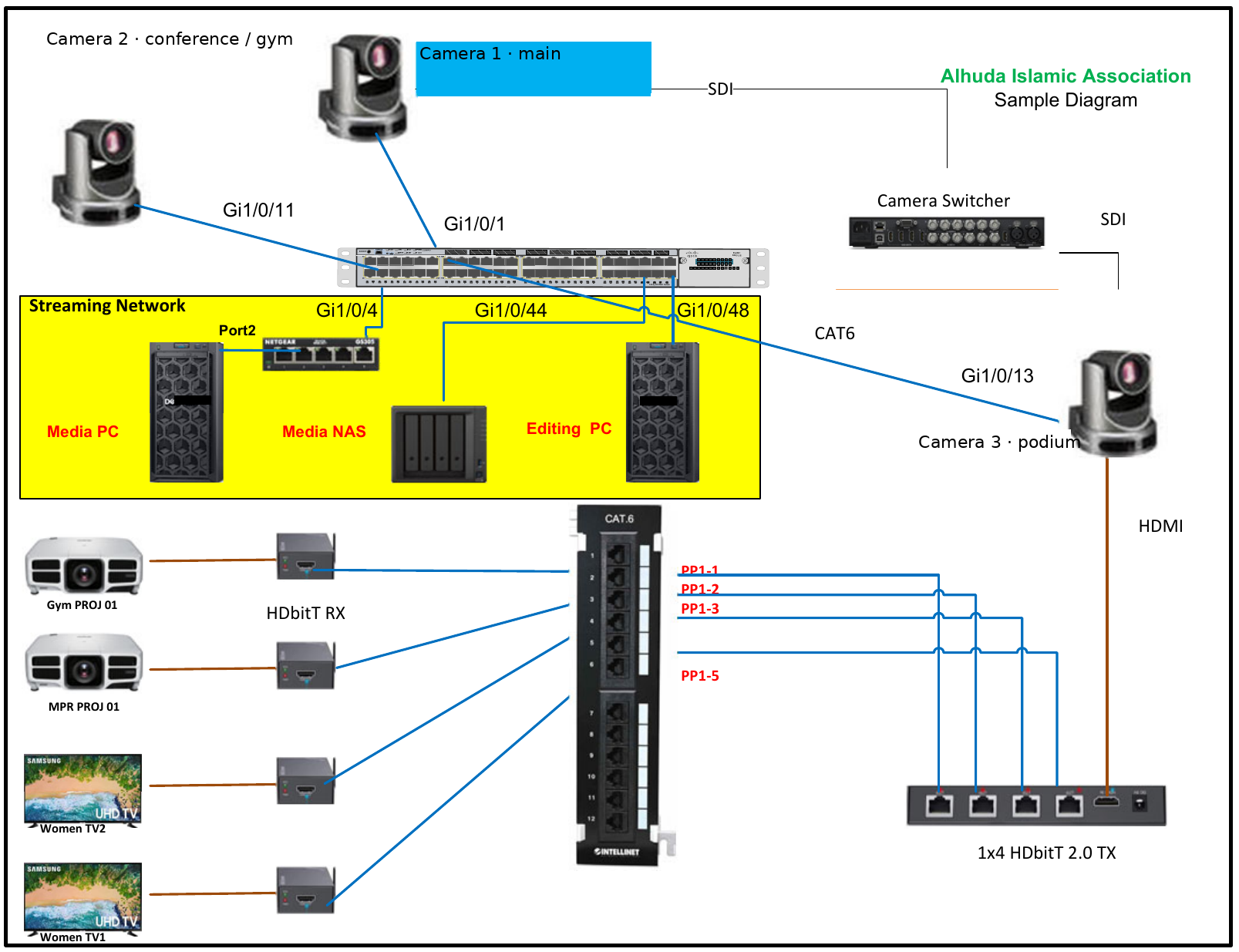
Capture: primary and auxiliary PTZ cameras on PoE with static addresses, isolated on a dedicated video VLAN.
Signal flow: SDI from the main camera into Blackmagic switchers and Web Presenters, then to a streaming and editing workstation for YouTube. HDMI is sent at the same time through a matrix and Ethernet extenders to displays around the building.
Audio: house sound fed directly into the switcher to remove audio/video drift.
Remote control: off-site operators run the stream over a secure VPN.
Outdoor reach: a 500-foot wireless bridge to an outdoor-rated cabinet with its own PoE switch. A year later I redesigned it with dedicated video transmission and frequency separation, so the outdoor livestream no longer drops.
Standardization: diagrams, configuration notes and checklists so other organizations could repeat the build and volunteers could run it.
Signal flow for a standard site. The outdoor extension is added where a site holds outdoor events.My original Visio drawing for the first site, showing the switch ports, patch panel and HDbitT distribution. Device hostnames replaced. Click to enlarge.
ResultA documented, repeatable setup that volunteers can run, now in use at most mosques in Dearborn and Hamtramck. At Alhuda it supported fundraising that generated $373,000 in donor contributions.
Live streaming
SDI / HDMI
VLAN
PoE
VPN
Wireless bridging
Standardization
Identity · troubleshooting
Active Directory repair and Microsoft 365 hybrid identity
Client
Religious nonprofit, 10–20 users
Stack
Windows Server 2019 · AD DS · DNS · Hyper-V · Microsoft 365 via CSP · Entra Connect Sync
Role
Diagnosis, remediation and cloud onboarding
Problem
New workstations could not join the domain and failed with error 0x54b ("network name cannot be found"). The organization ran on a single physical domain controller that was also its file server. If that server failed, sign-ins and shared files went down with it.
Diagnosis
Traced the failures to DNS. The _msdcs and _ldap SRV records that clients use to find a domain controller were missing.
Found DHCP running on the domain controller itself. The domain name was also hosted publicly at the registrar, which created a split between internal and public DNS.
Decided not to demote the only domain controller, a common shortcut that risks losing the domain entirely.
What I built
Corrected internal DNS so clients locate the domain controllers reliably.
Added a second domain controller as a Hyper-V virtual machine, giving the domain redundancy and a safe path to retire or rebuild the original server later.
Brought the organization's domain into Microsoft 365 through a CSP. That included fixing GDAP delegated-admin permissions so the tenant could be managed.
Installed Entra Connect Sync so staff use one identity, user@their-domain, both on-premises and in Microsoft 365.
End state. Hostnames, domain names and addressing are omitted.
ResultWorkstations join and sign in normally. The domain no longer depends on one machine, and staff have a single identity across on-premises resources and Microsoft 365. Everything has been running cleanly since.
Active Directory
DNS / SRV records
Hyper-V
Entra Connect
Microsoft 365
GDAP / CSP
Troubleshooting · after a cutover
Classroom outage after a network cutover
Client
Religious nonprofit with classrooms
Stack
Palo Alto firewall · Cisco Layer 3 core · VLANs · Windows Server DNS/DHCP · PowerShell
Role
Incident response and root-cause analysis
Problem
After a planned cutover to new network equipment, classroom machines on the staff VLAN couldn't get addresses or resolve names. The domain controller sat on the management VLAN. Ping between the two worked, so the network looked healthy.
What I did
Restored service first: moved the affected users to a temporary, isolated VLAN with access to the resources they needed, so classes could continue without opening up the network.
Diagnosed from the endpoints: used PowerShell on several workstations and confirmed they couldn't locate or resolve the domain controller, even though ping succeeded.
Found the root cause: traced it back to one firewall ACL between the management and staff VLANs that blocked DNS and DHCP while allowing ping.
Fixed the rule within two days.
The trap: ping succeeded, so the network looked fine, while the services clients depend on were blocked.
ResultClasses kept running on the temporary VLAN, and the root cause was fixed within two days. Since then, after every cutover I check that services like DNS and DHCP actually work, not just that ping succeeds.
Firewall ACLs
VLANs
DNS / DHCP
PowerShell
Incident response
In-house · infrastructure overhaul
Server migration, phone system and infrastructure overhaul
Client
Quality Restaurant Equipment Masters, warehouse and office (my employer)
Stack
Windows Server 2008 R2 → 2019 · DFS Replication · VoIP · Syncro RMM · Group Policy · Python
Role
Network and Systems Administrator
Problem
The company ran on a Windows Server 2008 R2 server, long out of support. Five or six separate phone lines ran across the warehouse and office, and nobody had a clear picture of who used which line or why so many were needed. Patching was inconsistent.
What I did
Server migration: moved the 2008 R2 environment to a new Windows Server 2019 server in planned phases, using DFS Replication to move data with no loss, then repurposed the old server as a redundant server.
Traced every phone line through the warehouse and office and mapped who had access to each one and how it was actually used.
Deployed a VoIP system for 7 users with softphones, auto attendant, simultaneous ring to mobile, holiday and after-hours routing, voicemail, and overhead paging to the warehouse.
Standardized patching with Syncro RMM and Group Policy for workstations, with manual patching for the remaining legacy 2008 R2 systems.
Documented the environment in a company-wide knowledge base.
Built an inventory tool in Python with barcode scanning, CSV import/export, packaged as a Windows app. I'm now integrating it with the WooCommerce store and QuickBooks Desktop.
Phone consolidation, before and after.
ResultA supported server with no data lost in the move, a redundant server built from the old hardware, and one phone system with clear ownership that reaches staff anywhere in the building or on mobile.
Server 2019
DFS-R
VoIP
Softphones
Syncro RMM
Python
Identity & infrastructure
Multi-site Active Directory build
Client
Tax and law firm, three locations, about 20 users
Stack
Windows Server 2022 · Active Directory · UniFi gateways · site-to-site VPN · Windows 11 Pro
Role
Design, build and handoff (1010 IT Solutions)
Problem
The firm ran on a Windows 11–based setup with no server or domain. Each office worked separately, accounts and file access were managed machine by machine, and sensitive client records had no central protection.
What I built
A Windows Server 2022 domain with a domain controller at each office, replicating over UniFi site-to-site VPN tunnels.
OUs and security groups matched to job roles: Staff with read/write access and Limited with read-only access to shared data.
File shares with NTFS permissions, file-access auditing and Volume Shadow Copies so users can restore their own deleted files.
Group Policy controls against data exfiltration: USB storage blocked, file copying restricted, network locations hidden, and a standard lock screen.
Domain-joined every workstation and resolved RDP issues so staff can reach machines between offices.
One domain, three sites. Each office keeps signing in locally if a tunnel drops.
ResultOne domain across three offices with redundant domain controllers, so staff share resources across sites under central accounts, auditing and data-loss controls. The build is complete, and the client now calls in only for support.
Windows Server 2022
AD DS
Group Policy
NTFS
Site-to-site VPN
UniFi
Continuity & recovery
Server rebuild and power resilience
Client
Small business, on-premises only
Stack
Server-grade hardware · RAID 5 · Windows Server 2022 · AD · dual UPS/PDU · NAS backup
Role
Scoping, build, vendor coordination
Problem
Construction nearby caused frequent power outages. Each one crashed the server, forced early closures, and had already caused data loss. The hardware had no redundancy, and there was no reliable backup. Operational limits ruled out moving to the cloud.
What I built
Specified and built a new server with redundant power supplies and multi-disk storage.
Configured RAID 5 for a balance of cost, speed and fault tolerance, and kept spare drives on hand.
Installed Windows Server 2022 and Active Directory, and used scripts to provision users, groups and Group Policy.
Worked with the line-of-business software vendors to host their databases and applications on the new server.
Connected each power supply to a separate PDU on its own UPS, with monitoring to alert on power events.
Set up daily backups to a dedicated NAS and ran routine test restores.
Two independent power paths into one server, with backups going to a separate NAS.
ResultNo single power supply, UPS or drive failure takes the server down, and backups are verified by regular test restores.
Network design, deployment, troubleshooting (1010 IT Solutions)
Problem
The store needed 64 cameras on the same network that carries point-of-sale, office and guest traffic, without those systems interfering with each other.
What I built
Separate VLANs for cameras, point-of-sale, recorders (NVRs), office PCs and guest Wi-Fi, managed centrally from the Omada controller.
Two 48-port PoE+ switches to power the cameras and a 24-port core switch to connect them.
Remote viewing through DDNS and port forwarding, with the ISP gateway in bridge mode so the Omada router handles routing.
Fixed post-install camera failures by tracing IP conflicts, switching loops and suspect cabling, one cause at a time.
Logical layout showing port counts and VLAN roles. VLAN IDs and addressing are omitted.
Result64 cameras online, with surveillance traffic kept off the payment and office networks. The project is complete.
VLAN design
PoE+
TP-Link Omada
NVR
Troubleshooting
More work
Shorter projects from consulting and earlier roles.
Medical · 3 sites
Imaging transfers over site-to-site VPN
Configured site-to-site VPN and DICOM settings across a three-site medical practice, working with a partner radiology office, so X-rays and imaging move securely between locations.
Accounting · 6 users
Microsoft 365 migration
Moved an accounting firm to Microsoft 365 on its own domain: mail DNS records, Entra ID, enforced MFA and license assignment, plus a standard onboarding process for new hires.
Nonprofit · 50+ users
Cisco to Fortinet cutover
Led the move from aging Cisco devices to Fortinet at a headquarters site with several satellite locations, with zero production downtime. Set up SSL VPN remote access with RADIUS and LDAP authentication.
Designs and proposals
Work in the design or proposal stage, including how I weighed the options.
In progress
Religious center and school: network, server and AV
Building
Gymnasium, two prayer halls, 20+ classrooms, offices and library · about 50 users
Scope
One MDF plus gym, library and school IDFs · Wi-Fi · streaming cameras and SDI runs · multi-display video distribution · student security controls
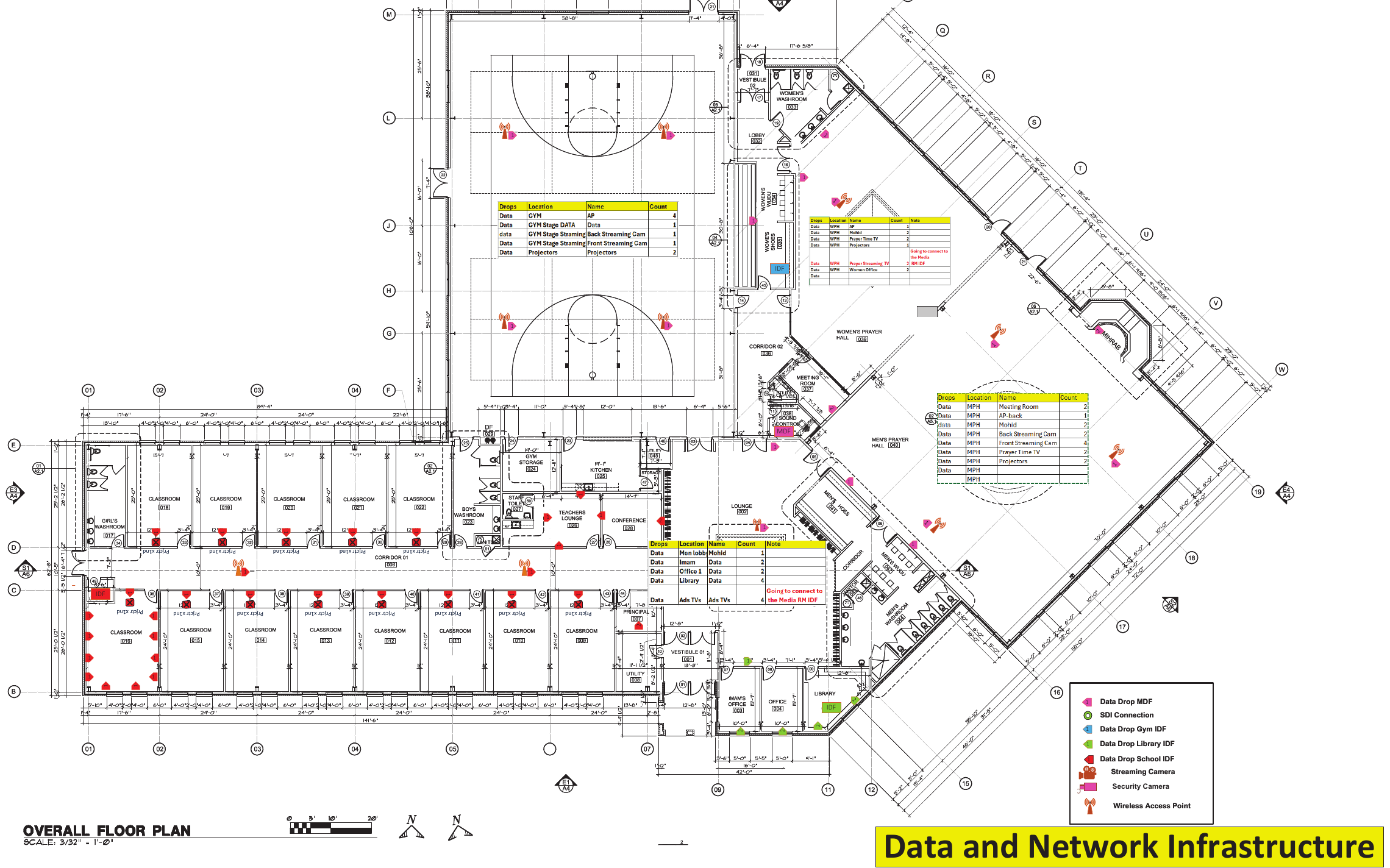
I'm designing and deploying the full network, server and AV infrastructure. I laid out the low-voltage plan on the architect's floor plan. Each drop is color-coded by the closet it homes to, so the installers know where every cable terminates. Each area has a drop schedule (room, purpose, count) next to it, and the prayer halls and gym are planned for the streaming standard above.
Network overlay on the architect's floor plan. Device names and architect notes removed. Click to enlarge.Proposal
Three-site medical practice: on-prem vs. cloud
Scope
~50 users · 3 locations · network and VLANs already in place
Design
One server per location with a domain controller, built on ASRock Rack with AMD EPYC 4000-series
Built around HIPAA and PCI requirements. I compared the on-prem design against a cloud model on Microsoft 365 Business Premium. With little existing Microsoft licensing, the cloud option meant new per-user costs, so the proposal laid out both paths for the client to decide on total cost, not just hardware price.
Proposal
Two-office nonprofit network on Grandstream
Scope
2 offices · 8 workstations · ~14 cable runs
Design
Wi-Fi 7 access point per office · 24–48 ports of switching · 4U cabinet with UPS and ISP shelf per office
A full parts list and labor plan for a grant-funded organization, standardized on one vendor so both offices are managed from a single cloud console. VoIP is planned as a second phase.